Note: Acrobat 9 has an updated Document Comparison function which works differently than that of Acrobat 8 and prior. To see a short demo movie of how it works in Acrobat 9, click here.
The other side is strictly maintaining document control for the new agreement you are negotiating. Opposing counsel will only give you a PDF and now there are several revisions.
If you had the original word processing files, you could compare them using a tool like Deltaview or perhaps the built-in tools provided in your word processor program.
But… you only have PDFs.
You need to find out what has changed.
What to do?
Fortunately, Acrobat Professional can create a side-by-side comparison report and to help you spot any changes.
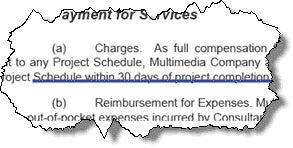
Deletions are indicated with red strikethrough text:
Additions have blue underlines:
Read on to learn how to easily compare two documents using Acrobat.
Document Comparison using Adobe Acrobat
Adobe Acrobat Professional 7 and 8 offer the ability to compare two PDFs.
To compare to PDFs:
Locate the original or older version of the file and open it in Acrobat
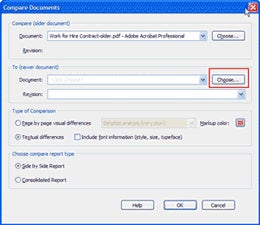
In Acrobat 7, choose Document—>Compare Documents In Acrobat 8, choose Advanced—>Compare Documents
Click the Choose . . . button and locate a newer version to compare
Enable the Textual Differences radio button
Enable the Side by Side Report radio button
Acrobat will produce a new PDF which contains a summary cover page:
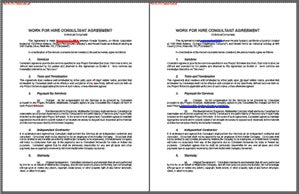
If you scroll down, Acrobat will display the older document on the left and the newer document on the right.
Other Comparison Considerations
Note that Acrobat creates a new, temporary document which represents the comparison. Don’t forget to save it if you will need it later.
Acrobat can also spot visual differences between documents. For example, it is possible to compare drawings. However, Acrobat will detect the subtlest change—even a single pixel.
Cookie Settings
General information
You can control how Adobe websites use cookies and similar technologies by making choices below. But note that if you disable cookies and similar technologies entirely, Adobe websites may not function properly.
Cookies are small text files stored by your web browser when you use websites. There are also other technologies that can be used for similar purposes like HTML5 Local Storage and local shared objects, web beacons, and embedded scripts. These technologies help us do things like remembering you and your preferences when you return to our sites, measure how you use the website, conduct market research, and gather information about the ads you see and interact with.
You can make choices in the menu below about what cookies and other technologies you want us to use on Adobe sites when you visit them from this browser. You can always change those choices later by clicking on the Cookie Preferences link at the bottom of the page.
If enabled:
We can improve your experience by tailoring the site and the content to things we think might be of interest
We can better keep track of your preferences — like what language you prefer to use
We will better understand your likely interests so we can provide you more relevant Adobe ads and content on non-Adobe websites and in non-Adobe apps
It will help us improve the performance of our website and those of our partners who use the Adobe Experience Cloud
If disabled:
We won’t be able to remember you from session to session so the experience may not be tailored to your interests
You’ll still have access to the content of the site but certain features that depend on cookies may not function
You’ll still see ads, they just may not be as relevant to you
General information
You can control how Adobe websites use cookies and similar technologies by making choices below. But note that if you disable cookies and similar technologies entirely, Adobe websites may not function properly.
Cookies are small text files stored by your web browser when you use websites. There are also other technologies that can be used for similar purposes like HTML5 Local Storage, web beacons, and embedded scripts. These technologies help us do things like remembering you and your preferences when you return to our sites, measure how you use the website, conduct market research, and gather information about the ads you see and interact with.
You can make choices in the menu below about what cookies and other technologies you want us to use on Adobe sites when you visit them from this browser. You can always change those choices later by clicking on the Cookie Preferences link at the bottom of the page.
If enabled:
We can improve your experience by tailoring the site and the content to things we think might be of interest
We can better keep track of your preferences — like what language you prefer to use
We will better understand your likely interests so we can provide you more relevant Adobe ads and content on non-Adobe websites and in non-Adobe apps
It will help us improve the performance of our website and those of our partners who use the Adobe Experience Cloud
If disabled:
We won’t be able to remember you from session to session so the experience may not be tailored to your interests
We’ll still count your use of our site and services
You’ll still have access to the content of the site but certain features that depend on cookies may not function
You’ll still see ads, they just may not be as relevant to you
Operate the site and core servicesOperate site and measure engagement
Always active
These cookies are required, and they are used to enable the site and related services core functionality. Without them the site could not operate, so they cannot be disabled.
These cookies enable the site and related services’ core functionality and collect statistics about user engagement, such as counting active use to help us understand trends. These cookies cannot be disabled.
Measure performance
These cookies are used to analyze site usage to measure and improve performance. Without them Adobe cannot know what content is most valued and how often unique visitors return to the site, making it hard to improve information we offer to you.
These cookies are used to analyze site usage to measure and improve performance. Without them Adobe cannot know what content is most valued, making it hard to improve information we offer to you.
Extend functionality
These cookies are used to enhance the functionality of Adobe sites such as remembering your settings and preferences to deliver a personalized experience; for example, your username, your repeated visits, preferred language, your country, or any other saved preference.
Personalize advertising
These cookies are used to enable Adobe and our partners to serve ads more relevant to your interests. Without them you will still see ads, but they might not be as relevant to you.