As Adobe Summit arrives again, it’s time to share some exciting news about a feature we are announcing in Adobe Analytics. To explain it properly, I have to harken back to when we released Anomaly Detection over a year ago. Anomaly Detection uncovers significant signals, or changes, in your trended data from among the noise. It literally finds the needle in your haystack of data. Once an anomaly has been identified, the next logical question is why. Why did revenue drop by 30 percent? Why did we experience an anomalous drop in video completes yesterday?
Anomalies – A Data Analysis Nightmare
Your boss stops by and asks, “Everything on track?” Tricky question. You may need to crunch millions or even tens of millions of records – site visits, bounce rates, unique visitors, conversion rates, revenue and dozens or hundreds of other metrics. Then, you must figure out if all these data fit their respective patterns. If any drifts outside a 95 percent confidence level margin, where typical noise fluctuations live, you have an anomaly on your hands.
Even if you somehow sift through and analyze enough data, and find some anomalies, you can be sure they’ll land right back on your desk. This time, the boss wants to know, “What’s causing it?” You’re in the hot seat and need to have an answer, and quick.
Data Scientists – Mismatch Between Supply and Demand
Data scientists are hackers by nature. They can throw together a query, code it, run statistical analyses and tests, bring in machine learning, figure out business problems, and even conjure up data visualizations to boil the complex results of their work down to an easy-to-grasp image or two. When a good data scientist finishes her work, not only has she made the problem seem simple, the path forward is clear as day.
Unfortunately, juxtaposing all these talents makes data scientists slightly harder to find than Bigfoot; and as basic economics teaches us, when something is in great demand and limited supply, its cost skyrockets. That’s why your boss is still looking to you for that answer.
Contribution Analysis – Adobe’s Data-Scientist-in-a-Box
Since finding a good data scientist is difficult and expensive, your boss is expecting you, a non-quant analyst, to do the job. Adobe has just released a great tool to bridge the gap – Contribution Analysis.
To help you get the job done without drowning in the details and mechanics of models, regressions and other statistical esoterica, Contribution Analysis does the heavy lifting in the background, and lets you concentrate on getting business answers for your boss and your company. This doesn’t mean you’ll never need a data scientist again, but it does mean you can do many of his tasks on your own.
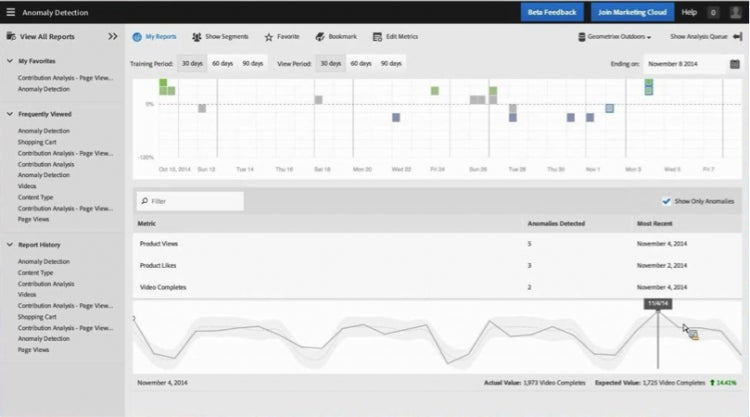
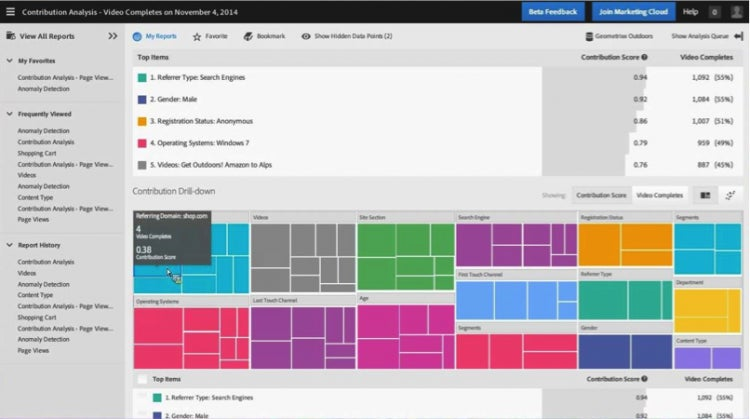
So how does it work? As the following illustration shows, Contribution Analysis is found by navigating to the Anomaly Detection Report within Reports & Analytics. After opening the trended visualizations containing anomalies, you simply identify an interesting anomaly in a metric within the trended visualizations. Now you want to know what caused that anomaly. Enter Contribution Analysis. You select your anomaly in the trended visualization and then click analyze.