Whether you’re looking to up your exercise game, plan a trip, or just send some greeting cards this April, our UXperts have some top recommendations for you. We’ve asked them to share app and web designs they’re loving right now, and tell us why they’re great examples of UX done right.
Sheldon Rennie, Senior UX/UI Designer and Art Director at Sheldon Rennie
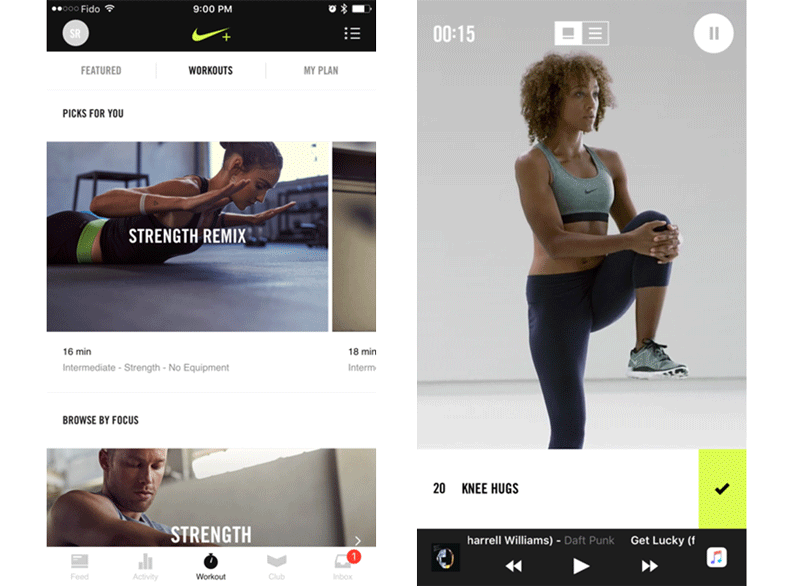
What I’m most impressed with is the in-workout experience. Nike has put a lot of thought into accommodating someone who is working out with their phone, and utilizes sound and video to make this much less awkward than it could be. The majority of the screen is taken up by a large, looping multi-angle instructional video that shows you exactly what you’re supposed to — and not supposed to — do. Voiceover prompts explain what to do for each move and encourage you to push harder. The main call-to-action is a bright green checkmark button that advances you to the next move. The workout ends with a satisfying completion screen that summarizes your efforts.
The design is so thoughtful you could almost forget you’re doing four reps of burpees. Almost.
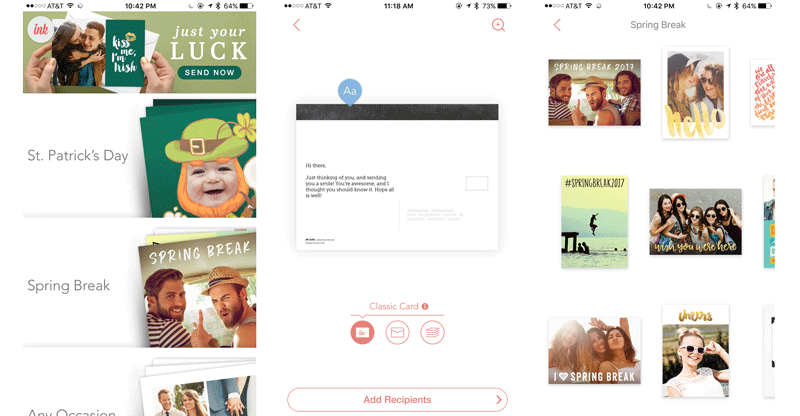
The first time I sent one, there was no confusion over how to choose a card, add photos or messages. I was in and out of the app within 15 minutes. My senators received personalized messages from me and I never had to get out a stamp, just my credit card.
Not only does the site look great on desktop but its responsive design for mobile keeps the experience the same. Here are some key highlights:
Design – Clean, simple typography, great use of videos
Content – Focused strictly on their variety of work and straight to the point
Navigation – Easy to get around the site with good use of scrolling to reveal more information. I love how they handle the next project at the bottom of the page transitioning into the next piece of work.
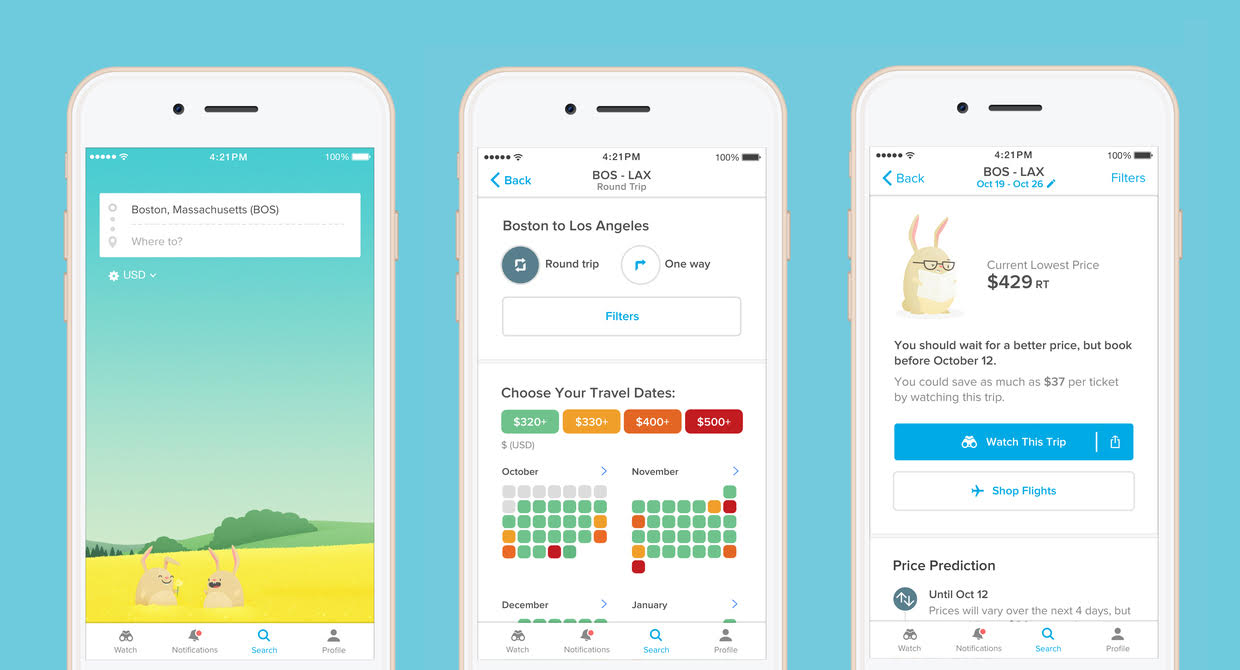
They’ve bolstered their feature set in recent months to include travel tips, and increased the amount of filtration on search results to include layovers, direct flights, and other finicky details that impact a user’s planning. For those of us with wanderlust, this is a real asset.
I’m a huge fan of the at-a-glance color coding, in-app animations, and the overall tone of the experience. The sign-up flow was also a delight, but the granular details are the big win for conversion: how much you save, how many seats are left, and you can close the sale in a couple of taps. On mobile devices, I expect a wicked simple checkout experience and Hopper delivers.
What websites or apps are you loving right now? Let us know in the comments!
You can control how Adobe websites use cookies and similar technologies by making choices below. But note that if you disable cookies and similar technologies entirely, Adobe websites may not function properly.
Cookies are small text files stored by your web browser when you use websites. There are also other technologies that can be used for similar purposes like HTML5 Local Storage and local shared objects, web beacons, and embedded scripts. These technologies help us do things like remembering you and your preferences when you return to our sites, measure how you use the website, conduct market research, and gather information about the ads you see and interact with.
You can make choices in the menu below about what cookies and other technologies you want us to use on Adobe sites when you visit them from this browser. You can always change those choices later by clicking on the Cookie Preferences link at the bottom of the page.
If enabled:
We can improve your experience by tailoring the site and the content to things we think might be of interest
We can better keep track of your preferences — like what language you prefer to use
We will better understand your likely interests so we can provide you more relevant Adobe ads and content on non-Adobe websites and in non-Adobe apps
It will help us improve the performance of our website and those of our partners who use the Adobe Experience Cloud
If disabled:
We won’t be able to remember you from session to session so the experience may not be tailored to your interests
You’ll still have access to the content of the site but certain features that depend on cookies may not function
You’ll still see ads, they just may not be as relevant to you
General information
You can control how Adobe websites use cookies and similar technologies by making choices below. But note that if you disable cookies and similar technologies entirely, Adobe websites may not function properly.
Cookies are small text files stored by your web browser when you use websites. There are also other technologies that can be used for similar purposes like HTML5 Local Storage, web beacons, and embedded scripts. These technologies help us do things like remembering you and your preferences when you return to our sites, measure how you use the website, conduct market research, and gather information about the ads you see and interact with.
You can make choices in the menu below about what cookies and other technologies you want us to use on Adobe sites when you visit them from this browser. You can always change those choices later by clicking on the Cookie Preferences link at the bottom of the page.
If enabled:
We can improve your experience by tailoring the site and the content to things we think might be of interest
We can better keep track of your preferences — like what language you prefer to use
We will better understand your likely interests so we can provide you more relevant Adobe ads and content on non-Adobe websites and in non-Adobe apps
It will help us improve the performance of our website and those of our partners who use the Adobe Experience Cloud
If disabled:
We won’t be able to remember you from session to session so the experience may not be tailored to your interests
We’ll still count your use of our site and services
You’ll still have access to the content of the site but certain features that depend on cookies may not function
You’ll still see ads, they just may not be as relevant to you
Operate the site and core servicesOperate site and measure engagement
Always active
These cookies are required, and they are used to enable the site and related services core functionality. Without them the site could not operate, so they cannot be disabled.
These cookies enable the site and related services’ core functionality and collect statistics about user engagement, such as counting active use to help us understand trends. These cookies cannot be disabled.
Measure performance
These cookies are used to analyze site usage to measure and improve performance. Without them Adobe cannot know what content is most valued and how often unique visitors return to the site, making it hard to improve information we offer to you.
These cookies are used to analyze site usage to measure and improve performance. Without them Adobe cannot know what content is most valued, making it hard to improve information we offer to you.
Extend functionality
These cookies are used to enhance the functionality of Adobe sites such as remembering your settings and preferences to deliver a personalized experience; for example, your username, your repeated visits, preferred language, your country, or any other saved preference.
Personalize advertising
These cookies are used to enable Adobe and our partners to serve ads more relevant to your interests. Without them you will still see ads, but they might not be as relevant to you.