Adobe and Microsoft Join Forces to Drive the Business of Creativity

Adobe Stock/stokkete
People generally think of Adobe Photoshop and InDesign when it comes to creating innovative content. But did you know that Adobe Acrobat, the most complete PDF solution to get work done anywhere, is the fourth most used Adobe Creative Cloud app right after Adobe Photoshop, Illustrator, and InDesign? That’s because there’s a business side to how creativity is delivered.
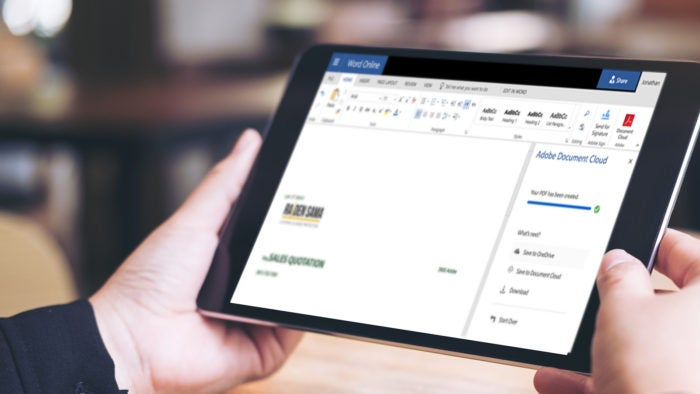
Today Adobe and Microsoft are once again joining forces to make it easier for creative agencies and their clients to quickly and easily share draft work, proposals, and other information with each other. For example, when marking up a proposal that’s been shared for review in SharePoint and OneDrive, there’s no need to open up a new application to markup that content for review. Simply launch PDF services inside SharePoint and OneDrive to save, store, and ultimately send your assets as high-quality, secure PDFs to clients and colleagues.
Because the services are integrated directly in SharePoint and OneDrive, creatives save time and can work more efficiently. In a world of looming deadlines and the constant demands to deliver more work in less time, every little bit helps.
Here are a few ways that the Adobe Document Cloud innovations unveiled today can help creatives get work done efficiently.
Streamlining creative collaboration
An ongoing challenge for creative agencies is working with projects in the form of Adobe Photoshop, Illustrator, and InDesign files, along with client-facing paperwork like contracts and proposals created in Microsoft Word or Excel.
It can get complicated reviewing and distributing all of those assets. Starting today, internal teams can save and store creative projects as PDFs that preserve the original fonts, formatting, and layouts without ever leaving Microsoft SharePoint and OneDrive. This is great for quickly and easily reviewing assets internally in one place before they’re client-ready.
Once the projects are ready for external partners and clients, the agency can combine the multiple file types—from Photoshop files to Microsoft Word documents—into a single, high-quality PDF to send for final approvals. If the approvals require e-signatures, Adobe Sign, the e-signature service in Adobe Document Cloud, is already integrated across Office 365, delivering fast, secure electronic signing on any device the clients are using.
Productivity and creativity on-the-go
Another helpful tool introduced today for the business of creativity is a business card reader in Adobe Scan, our free app that turns your mobile device into a portable PDF scanner. Business cards are still important currency for creative agencies looking to connect with new partners and clients. This latest innovation enables you to scan a business card and automatically capture name, email, phone number in your device.
Adobe Scan also turns your phone or tablet into a powerful scanning and text recognition tool that converts printed text into digital text that can be re-used wherever and whenever. This helps on-the-go interior designers who like to work off of physical design boards that highlight different inspirations for a room. Imagine simply scanning an image of a design board off of your device’s camera roll and reworking the copy before you send it to your client to review and approve. Or maybe you had a “Eureka!” moment in a restaurant and you sketch something on a napkin that you want your client to see right away. Easily scan the napkin sketch and send it to the client as a PDF to review and comment on. The client can send the PDF sketch back to with notes about suggested changes before you create the actual design.
Agencies, their partners, and their clients can’t deliver creative work if they don’t know how to interact and share information quickly and easily. Today’s news is another step in helping these groups be more productive than ever before.