After talking to hundreds of our customers over the last 24 months, we’ve heard that the interest and need for remote collaboration, review, and connectivity for video creation has grown faster than ever. If it was important before, it’s critical now. Today, I’m excited to share that Premiere Pro and After Effects customers get Frame.io for Creative Cloud as part of your subscription. Frame.io helps you work faster by connecting to the right people and reaching approval more quickly.
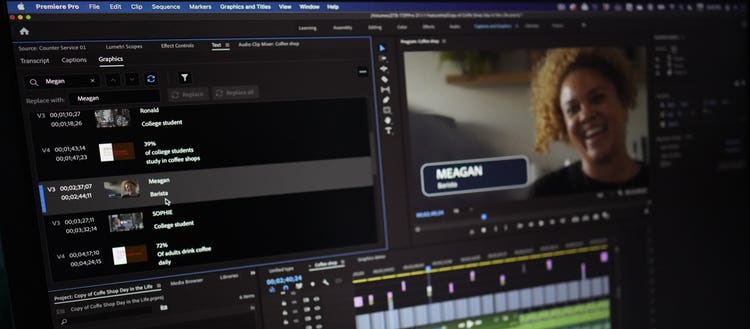
Frame.io’s professional, easy-to-use workflow lets you share a link to your video or composition with your team, client or any other reviewers you want. They can comment and draw on the video and you will see their time-stamped feedback directly in your timeline. You no longer need to decipher confusing email threads or spreadsheets to collect feedback. When finished, your reviewers can approve directly using the web link or award-winning Frame.io app. This helps you get to final faster and it is a pleasure to use.
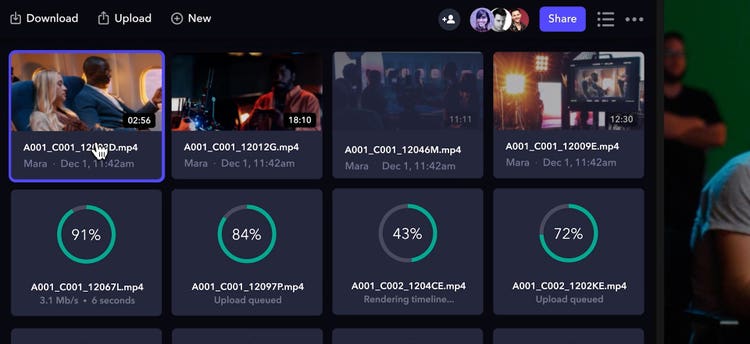
Frame.io for Creative Cloud also helps you organize assets all in one place. With 100GB of dedicated Frame.io storage, you can upload your media directly to the cloud for up to five active projects to share with another team member of your choice. This lets you quickly upload and download media and other files from Premiere Pro and After Effects without having to use a separate service.
You also have access to Frame.io Camera to Cloud, which takes files right off your camera and puts them in the cloud as soon as you stop recording. No more waiting. No more transferring files. No manual uploading or downloading. And no disk drives. The footage is available nearly instantly so people can start work while you are still shooting. Check out how the Golden State Warriors get up-to-the-minute game action instantly posted to social media using Camera to Cloud and Premiere Pro.
Starting today, Frame.io for Creative Cloud is available in the latest versions of Premiere Pro and After Effects rolling out worldwide. Once you have updated your apps, sign into the Review with Frame.io panel using your Adobe ID. If you are on an older version, you also can install the Frame.io panel or visit the Frame.io web app directly via app.frame.io.
Frame.io for Creative Cloud is an important first step toward building a powerful platform for the future of video creation. Stay tuned for more developments from us as we build a full collaboration platform that connects video teams, media, and workflows from beginning to end to help get your job done faster and easier.
Be sure to check out the other new features now available in Premiere Pro and After Effects. It is great to be heading back to NAB this year to see our customers and partners with Frame.io as part of the Adobe family. We look forward to seeing you there to share more about Frame.io for Creative Cloud and all the other amazing new capabilities in our video apps.
Frame.io for Creative Cloud now in Premiere Pro and After Effects.
Get to final faster with the world’s most powerful video review and collaboration tools.
As part of our mission to empower creativity for all, Adobe announced we've completed the acquisition of Frame.io, an industry-leading video collaboration platform.
10-07-2021
New in Premiere Pro: Remix for music and 3x faster Speech to Text
Premiere Pro introduces Remix, to intelligently retime music, and create Speech to Text faster for captioning videos.
Put more character into your video content: new tools for titles, graphics and animation
The December 2021release of the Creative Cloud video applications adds impact to video with powerful text and shape tools in Premiere Pro and innovations that fast-track puppet design and animation in Adobe Character Animator.
12-14-2021
Title
Premiere Pro and After Effects Now Include Frame.io for Creative Cloud
Description
Frame.io is now included with Adobe Premiere Pro and After Effects, providing integrated review and approval with unlimited reviewers and Camera to Cloud.
You can control how Adobe websites use cookies and similar technologies by making choices below. But note that if you disable cookies and similar technologies entirely, Adobe websites may not function properly.
Cookies are small text files stored by your web browser when you use websites. There are also other technologies that can be used for similar purposes like HTML5 Local Storage and local shared objects, web beacons, and embedded scripts. These technologies help us do things like remembering you and your preferences when you return to our sites, measure how you use the website, conduct market research, and gather information about the ads you see and interact with.
You can make choices in the menu below about what cookies and other technologies you want us to use on Adobe sites when you visit them from this browser. You can always change those choices later by clicking on the Cookie Preferences link at the bottom of the page.
If enabled:
We can improve your experience by tailoring the site and the content to things we think might be of interest
We can better keep track of your preferences — like what language you prefer to use
We will better understand your likely interests so we can provide you more relevant Adobe ads and content on non-Adobe websites and in non-Adobe apps
It will help us improve the performance of our website and those of our partners who use the Adobe Experience Cloud
If disabled:
We won’t be able to remember you from session to session so the experience may not be tailored to your interests
You’ll still have access to the content of the site but certain features that depend on cookies may not function
You’ll still see ads, they just may not be as relevant to you
General information
You can control how Adobe websites use cookies and similar technologies by making choices below. But note that if you disable cookies and similar technologies entirely, Adobe websites may not function properly.
Cookies are small text files stored by your web browser when you use websites. There are also other technologies that can be used for similar purposes like HTML5 Local Storage, web beacons, and embedded scripts. These technologies help us do things like remembering you and your preferences when you return to our sites, measure how you use the website, conduct market research, and gather information about the ads you see and interact with.
You can make choices in the menu below about what cookies and other technologies you want us to use on Adobe sites when you visit them from this browser. You can always change those choices later by clicking on the Cookie Preferences link at the bottom of the page.
If enabled:
We can improve your experience by tailoring the site and the content to things we think might be of interest
We can better keep track of your preferences — like what language you prefer to use
We will better understand your likely interests so we can provide you more relevant Adobe ads and content on non-Adobe websites and in non-Adobe apps
It will help us improve the performance of our website and those of our partners who use the Adobe Experience Cloud
If disabled:
We won’t be able to remember you from session to session so the experience may not be tailored to your interests
We’ll still count your use of our site and services
You’ll still have access to the content of the site but certain features that depend on cookies may not function
You’ll still see ads, they just may not be as relevant to you
Operate the site and core servicesOperate site and measure engagement
Always active
These cookies are required, and they are used to enable the site and related services core functionality. Without them the site could not operate, so they cannot be disabled.
These cookies enable the site and related services’ core functionality and collect statistics about user engagement, such as counting active use to help us understand trends. These cookies cannot be disabled.
Measure performance
These cookies are used to analyze site usage to measure and improve performance. Without them Adobe cannot know what content is most valued and how often unique visitors return to the site, making it hard to improve information we offer to you.
These cookies are used to analyze site usage to measure and improve performance. Without them Adobe cannot know what content is most valued, making it hard to improve information we offer to you.
Extend functionality
These cookies are used to enhance the functionality of Adobe sites such as remembering your settings and preferences to deliver a personalized experience; for example, your username, your repeated visits, preferred language, your country, or any other saved preference.
Personalize advertising
These cookies are used to enable Adobe and our partners to serve ads more relevant to your interests. Without them you will still see ads, but they might not be as relevant to you.