Letting machine learning choose the right font for everyone
Zoya Bylinskii
06-23-2022
Image credit: Adobe Stock/ PureSolution.
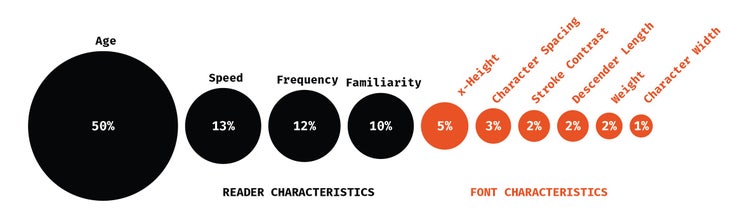
Did you know you have the ability to read 20 percent faster just by changing the reading font? Which fonts are effective for reading depends largely on the individual, and while age is a significant factor, so is reading proficiency (speed, frequency, etc.), familiarity with a particular font and style, and other reader characteristics like reading difficulties.
Given all the factors involved, and more than 800,000 digital fonts available to choose from, it can be difficult and overwhelming to know which font is optimized for your reading style. But what if a machine learning (ML) algorithm could handle the decision making for you?
In Personalized Font Recommendations: Combining ML and Typographic Guidelines to Optimize Readability, recently published in the ACM DIS’22 journal, we conducted a study to help inform which font characteristics work particularly well for different types of readers. The findings helped to build these relationships into a model to recommend faster fonts for specific readers. The study was a collaboration between vision scientists, data scientists, and typographers. “It’s really exciting to explore whether machine learning could be harnessed to personalize reading experiences,” said lead author and Acrobat.com ML engineer, Tianyuan Cai.
Reimagining reading to better fit each reader
We’re working with educators, experts, nonprofits, and technologists to personalize the experience of reading on digital devices and help people of all ages and abilities read better.
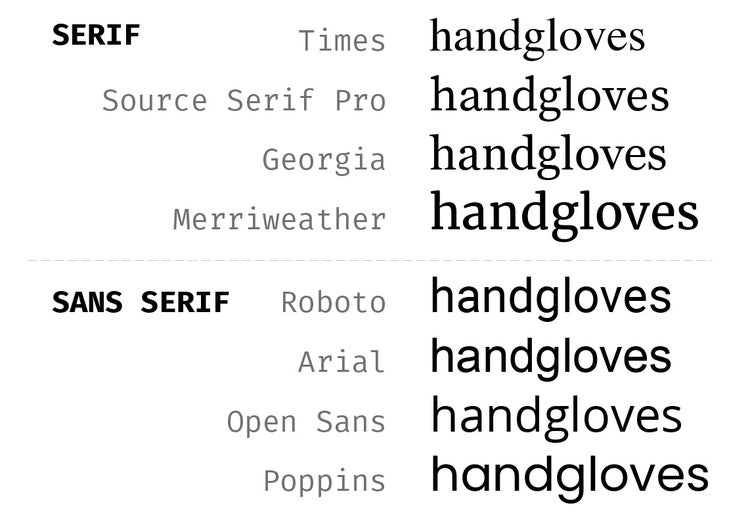
We interviewed several typographers to understand which design features make specific fonts particularly optimized for reading. Based on our interviews, eight fonts were selected, and 252 remote participants (ages ranging from 18 to 71) read passages and answered comprehension questions.
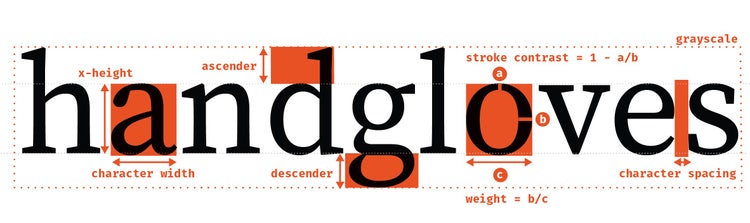
Above are eight fonts selected, in consultation with typographers, for our study, which focused on digital reading. Four serif fonts approximately match the look and feel of the four sans serif fonts, including fonts that have perceptually different sizes. Typographers control the appearance of fonts by adjusting font metrics. In the second image we see how researchers visualize the font metrics under consideration for our study and model.
Like findings from previous research, participants struggled to identify a faster reading font by preference alone. In our study, participants’ most preferred fonts are, on average, just as fast as a font selected at random. This result strengthened our motivation to find an automatic way of recommending fonts to readers. Our ML model predicts fonts that help people read approximately 23 WPM faster than a randomly chosen font, and 159 WPM faster than their slowest font.
These are real gains that our model achieves by learning to relate reader characteristics to font characteristics:
Heavier font weight benefits older readers but has minimal impact on younger readers.
Across all readers, the fonts with the thinnest strokes (i.e., Times and Source Serif Pro) had the most negative effects on reading speed.
Age significantly plays into which fonts are recommended for which readers. In our study, participants 40 years and older received recommendations for Georgia font more than the younger participants, who received more recommendations for Poppins. Arial, with its taller lowercase characters, was a good compromise across age groups.
In this work, we relate these characteristics by comparing the eight fonts tested and support our findings with prior literature. More work is underway to evaluate the model with a larger set of fonts and testing for repeatability of these findings.
Our model uses characteristics of readers and fonts to predict suitable fonts for individual readers. Age is a factor that the model considers relevant, but also the readers’ self-reported reading speed, frequency of reading, and familiarity with the font in question.
Will users actually be open to the idea of choosing their reading font with the help of machine learning? 90 percent of our study participants agree that personalizing fonts can lead to improvements in reading, and 86 percent said they would trust a font recommendation if it was generated by a computer algorithm. Thus, the way is clear for the text personalization algorithms of the future, and it is up to us to help build them.
Recommended for you
The need to personalize fonts for each individual reader
Adobe research explores how fonts affect the reading performance of adult readers on their computers or mobile devices.
05-10-2022
Adobe Announces Readability Consortium with Google and University of Central Florida to Improve Reading for All Ages and Abilities
Adobe Announces Readability Consortium with Google and University of Central Florida to Improve Reading for All Ages and Abilities
Liquid Mode delivers better digital reading experiences for all students
The Readability Consortium explores new technologies, tests, and tools that will help people maximize readability on their apps. By helping students discover their best readability settings, the Consortium aims to make reading a more enjoyable experience for students, improving comprehension and learning.
02-15-2022
Title
Letting machine learning choose the right font for everyone
Description
Personalized Font Recommendations: Combining ML and Typographic Guidelines to Optimize Readability
You can control how Adobe websites use cookies and similar technologies by making choices below. But note that if you disable cookies and similar technologies entirely, Adobe websites may not function properly.
Cookies are small text files stored by your web browser when you use websites. There are also other technologies that can be used for similar purposes like HTML5 Local Storage and local shared objects, web beacons, and embedded scripts. These technologies help us do things like remembering you and your preferences when you return to our sites, measure how you use the website, conduct market research, and gather information about the ads you see and interact with.
You can make choices in the menu below about what cookies and other technologies you want us to use on Adobe sites when you visit them from this browser. You can always change those choices later by clicking on the Cookie Preferences link at the bottom of the page.
If enabled:
We can improve your experience by tailoring the site and the content to things we think might be of interest
We can better keep track of your preferences — like what language you prefer to use
We will better understand your likely interests so we can provide you more relevant Adobe ads and content on non-Adobe websites and in non-Adobe apps
It will help us improve the performance of our website and those of our partners who use the Adobe Experience Cloud
If disabled:
We won’t be able to remember you from session to session so the experience may not be tailored to your interests
You’ll still have access to the content of the site but certain features that depend on cookies may not function
You’ll still see ads, they just may not be as relevant to you
General information
You can control how Adobe websites use cookies and similar technologies by making choices below. But note that if you disable cookies and similar technologies entirely, Adobe websites may not function properly.
Cookies are small text files stored by your web browser when you use websites. There are also other technologies that can be used for similar purposes like HTML5 Local Storage, web beacons, and embedded scripts. These technologies help us do things like remembering you and your preferences when you return to our sites, measure how you use the website, conduct market research, and gather information about the ads you see and interact with.
You can make choices in the menu below about what cookies and other technologies you want us to use on Adobe sites when you visit them from this browser. You can always change those choices later by clicking on the Cookie Preferences link at the bottom of the page.
If enabled:
We can improve your experience by tailoring the site and the content to things we think might be of interest
We can better keep track of your preferences — like what language you prefer to use
We will better understand your likely interests so we can provide you more relevant Adobe ads and content on non-Adobe websites and in non-Adobe apps
It will help us improve the performance of our website and those of our partners who use the Adobe Experience Cloud
If disabled:
We won’t be able to remember you from session to session so the experience may not be tailored to your interests
We’ll still count your use of our site and services
You’ll still have access to the content of the site but certain features that depend on cookies may not function
You’ll still see ads, they just may not be as relevant to you
Operate the site and core servicesOperate site and measure engagement
Always active
These cookies are required, and they are used to enable the site and related services core functionality. Without them the site could not operate, so they cannot be disabled.
These cookies enable the site and related services’ core functionality and collect statistics about user engagement, such as counting active use to help us understand trends. These cookies cannot be disabled.
Measure performance
These cookies are used to analyze site usage to measure and improve performance. Without them Adobe cannot know what content is most valued and how often unique visitors return to the site, making it hard to improve information we offer to you.
These cookies are used to analyze site usage to measure and improve performance. Without them Adobe cannot know what content is most valued, making it hard to improve information we offer to you.
Extend functionality
These cookies are used to enhance the functionality of Adobe sites such as remembering your settings and preferences to deliver a personalized experience; for example, your username, your repeated visits, preferred language, your country, or any other saved preference.
Personalize advertising
These cookies are used to enable Adobe and our partners to serve ads more relevant to your interests. Without them you will still see ads, but they might not be as relevant to you.