Subscribe to the Security@Adobe newsletter
Don’t miss out! Get the latest Adobe security news and exclusive content delivered straight to your inbox.

Modern security programs and product teams generate more data than ever before. In many organizations, this data is often distributed across a growing set of tools: Vulnerabilities living in one system, compliance status in a separate dashboard, ticket and service level agreement (SLA) tracking in yet another. Each tool provides an important piece of the picture, but working across them creates friction. The challenge isn’t the volume of data, but it’s bringing those perspectives together into a cohesive view that provides shared context and helps teams to align and prioritize effectively.
Rather than introducing yet another dashboard, we focused on reducing the number of dashboards by improving security visibility and prioritization efforts and bringing key security signals together in a way that supports meaningful decision making. At Adobe, this led to the development of the Security Workbench, a unified workspace that brings vulnerability management, compliance data, and ticket and SLA tracking into a single view.
In this blog, we share our approach and lessons learned, and how unifying security visibility and prioritization into one trusted view and leveraging AI for prioritization helps translate visibility into more consistent, scalable outcomes.
The Security Workbench was designed to remove friction by creating one place for security work. Instead of sprawling between dashboards, switching contexts, and reconciling different definitions, teams can quickly view a prioritized set of data including open tickets, SLA status, overdue work, vulnerability findings, compliance posture, end-of-life tracking, and security stack alignment in one unified workspace. This shared view creates common context across teams, making it easier to align priorities and act without navigating multiple tools or inconsistent filters. By having a data center of gravity, we created a network effect where teams across the organization began requesting their data be included, instead of us having to go and seek it out. This center of gravity also made it easier to develop AI prioritization tooling, layered on top of key data points.
From the start, our goal wasn’t to build a brand-new platform from scratch, but to create a unified experience by thoughtfully connecting what already existed. Rather than treating this as a large, standalone initiative, we focused on making incremental progress – building on proven foundations and adding priority data sets incrementally, while iterating closely with our users. Below are the key steps and lessons we learned while building and rolling out the Security Workbench at Adobe:
To kick off our journey, we began by leveraging Adobe’s existing Common Controls Framework (CCF), a platform for mapping and automating compliance controls at scale. By leveraging a platform that already connected existing data pipelines, such as vulnerability management, ticketing, and governance and risk tooling, we accelerated delivery, avoided duplicating infrastructure, and aligned the Workbench with existing dashboards and reporting.
Visibility alone isn’t enough. Without a common data model and consistent definitions, teams still struggle to align on what the data means and what to do next. To address this, we unified vulnerability data from bug bounty, scanning, and red team programs, along with compliance data, into a single logical model with shared definitions, severity groupings, and SLA views so information could be interpreted and acted on consistently across teams.
While the Security Workbench serves as a single destination, it is intentionally not one-size-fits-all. Role-based experiences help to make sure each audience gets the right level of security visibility without added complexity. With a shared data foundation in place, we designed the Workbench with views tailored to each team’s role.
Operators like product security teams rely on tactical views that centralize tickets, SLAs, vulnerabilities, control readiness, end-of-life status, and security stack adoption, providing the operational detail needed for day-to-day execution. Product and executive leaders, by contrast, rely on higher-level quarterly views that surface overall security posture and trends to support longer term planning and investment decisions.
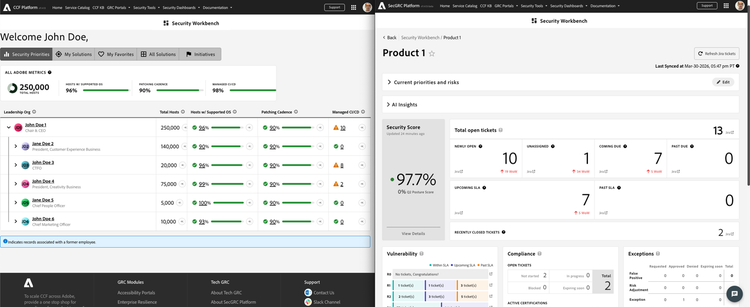
Prioritization is as important as visibility. The Security Workbench includes an AI-powered prioritization layer – with built-in human oversight and guardrails – that evaluates factors such as vulnerability criticality, due dates, SLA impact, and ticket age to surface the highest priority work. Top recommendations appear directly in the Workbench, reducing manual triage and helping teams focus quickly on what matters most.
A core design principle of the Workbench was that it should fit naturally into existing workflows and promote action. Users can drill down from summary widgets, jump directly into tickets, and use features like Favorites and dynamic filtering to quickly access the products and teams they care about most. By presenting data in tailored, digestible views (e.g., vulnerabilities by severity) the Workbench helps translate security visibility to action and becomes part of how teams work rather than an extra report to check.
From the beginning, we instrumented the Security Workbench with Adobe Analytics to understand how it was being used. Structured beta phases, paired with surveys and direct feedback, helped us validate assumptions, identify friction points, and prioritize the backlog based on real workflows.
This feedback informed a phased rollout, starting with a focused beta to demonstrate value early and expanding to more than 50 teams with higher impact capabilities such as enhanced vulnerability views, top priority recommendations, and executive scorecards. By adding capabilities incrementally rather than all at once, we were able to balance delivering value early while keeping investment and risk relatively low, using customer visit frequency, satisfaction, and business priority data to guide what to build next and support sustained growth.
Unifying security visibility and prioritization through the Security Workbench delivered measurable benefits across efficiency, clarity, and scalability.
More broadly, the Security Workbench helps make security operations more consistent and proactive. By consolidating critical signals and applying prioritization where it matters most, teams can manage risk at scale while shifting away from fragmented, tool-hopping workflows.
For organizations facing similar dashboard sprawl, this experience demonstrates that consolidation, smart prioritization, and reuse of existing platforms can drive real efficiency and better decisions, without a disruptive rebuild. The pattern is repeatable: unify data, design by role, layer in AI with guardrails, and continuously iterate with user feedback.
This workbench initiative was made possible through the collaboration of: Ana Lipianu, Catherine Dodge, Chell LaRue, Chris de Groot, Manish Budhraja, Rahat Sethi, Samuel Buck, Shivam Gupta, and Suman Mehta.
Don’t miss out! Get the latest Adobe security news and exclusive content delivered straight to your inbox.

Adobe is joining the Industry Accord Against Online Scams & Fraud to strengthen prevention and protect people across the digital ecosystem.
03-16-2026

Red teams play a fundamental role in helping security organizations understand how real-world adversaries think and operate.
02-05-2026
In this blog, we share insights into how we’ve built our cybersecurity metrics program at Adobe and the key lessons we’ve learned along the way.
05-20-2025