Creativity looks different for everyone. For some of you, it’s an 8K timeline or a 3D asset with a hundred textured layers. For others, it’s a quick social post, a flyer, or a photo that needs to look just right. Today at Adobe MAX, we’re sharing how Adobe and Microsoft are working together to bring Adobe’s creative tools to more people on Windows, so they can create at the scale of their ambition, right where they already work.
For creative professionals, Photoshop, Premiere, After Effects, and Substance 3D Painter (beta) are now optimized for AI processing, editing, color, and effects on high-performance Windows PCs, so you can work faster and stay in your creative flow. And for everyone who wants to create something great quickly and easily, Adobe Express capabilities are coming to Microsoft Photos, with a preview for Windows Insiders starting in December. We’re also making it easy to access capabilities in Express, putting it right at your fingertips in Windows.
“Microsoft’s partnership with Adobe is about giving creators more ways to create on Windows, from the apps and capabilities needed for demanding professional work to quick and easy tools for everyday projects,” said James Howell, Vice President, Windows Consumer Marketing, Microsoft. “Whatever they’re making, we want creators to have the choice and tools to do it on the Windows PC that’s right for them.”
Create at the speed of your imagination on high-performance Windows devices
We’ve been bringing the power of NVIDIA RTX Spark to our flagship agentic creative tools to deliver faster AI processing, editing, color and effects so you can work faster on the device of your choice and stay in your creative flow. Today, you can use optimized versions of Photoshop, Premiere, After Effects and Substance 3D Painter (beta) on high-performance Arm-based Windows PCs, including the new Surface Laptop Ultra, powered by NVIDIA RTX Spark, built to handle demanding creative, technical and AI workloads.
We've rearchitected Photoshop to be faster and more responsive for creative tasks on Arm-based Windows PCs. For example, the Remove tool can take out distractions and produce realistic new content faster with local on-device generative AI. We’re also developing a new compositing-based architecture for Photoshop to give you live filters, HDR, and brushing capabilities that feel more natural than ever.
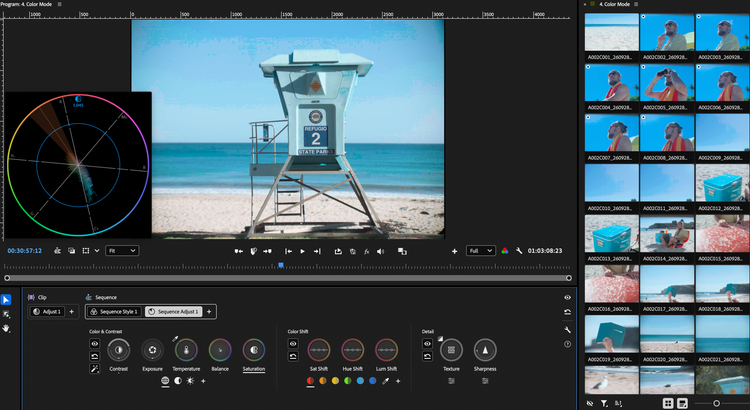
Video pros can execute demanding post-production workflows in Premiere on Surface devices, including playback and rendering effects, color and more. Premiere’s optimized video pipeline provides more real-time performance when editing and color correcting, and faster rendering of even your most complex timelines. You'll also see tangible speed gains in popular audio and video features in Premiere like Enhance Speech and Object Mask. When you want to go deeper with precision matte refinement, you can bring your projects seamlessly into After Effects, which has been optimized in the same way.
3D pros can texture production-ready 3D assets in the optimized version of Substance 3D Painter (beta), with workstation-class performance on a thin, portable laptop device. You’ll spend less time waiting on GPU-heavy tasks like baking mesh maps and working with large assets and texture sets.
Together with Microsoft, we’ll keep benchmarking and optimizing these apps for even more power and speed, so you can get the outcomes you want.
Easy AI-editing tools and pro templates from Adobe Express in Microsoft Photos
Not everything you make needs a timeline or a 3D scene. Sometimes you just want a photo to look better, a flyer ready by Friday, or a post that looks like you spent hours on it. That's why we're working with Microsoft to bring Adobe-powered AI-editing and Adobe Express templates to Microsoft Photos on Windows 11, the app people already use every day to view and edit their photos. These features will be available in preview to Windows Insiders in the coming months.
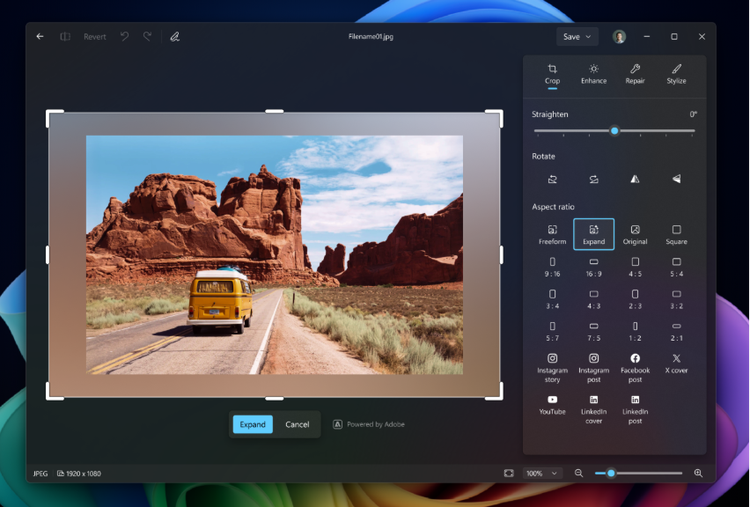
Your favorite photos can be the starting point for something new. Directly in the native Editor, you'll be able to give a tightly framed photo more room by extending the scene beyond its original borders. You can also rotate your photo without cropping away part of the picture, with the edges filling in naturally. If you have a different look in mind, select an area or object and describe what you'd like to add or change. For a quick cleanup, select an unwanted object and remove it, with the background blending naturally into place.