Many advertisers are using dynamic creative optimization (DCO) for retargeting high-value website visitors who, based on their actions on the brand’s website — such as visiting product pages and adding items to shopping carts — have shown purchasing intent. Advertisers get a second chance to drive a conversion. Retargeting is a proven, always-on tactic for most advertisers. DCO allows deeper personalization of retargeted ads, driving better engagement and performance.
While we hear a lot about using DCO for retargeting, what about employing DCO for prospecting campaigns?
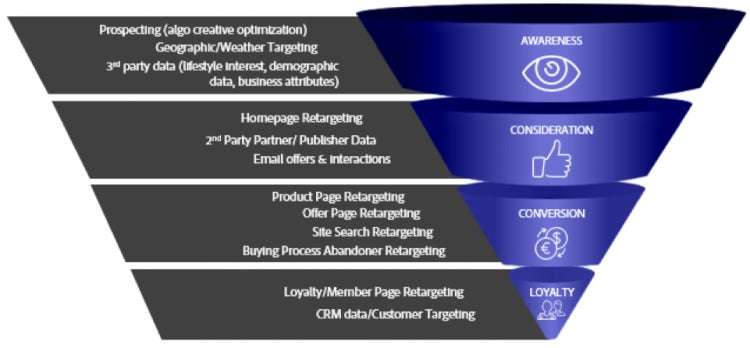
Advertisers can use DCO across the marketing funnel — for everything from retargeting and loyalty programs to new- customer acquisition and awareness campaigns. Even if very little is known about the audience or user that is viewing the ad, DCO can deliver a lift in performance. For one Adobe customer, using algorithmic creative optimization for geotargeted campaigns resulted in a 10-percent lift in click-through rate (CTR) over standard display ads. The more we know about the audiences across the funnel, the better the performance. Performance results for this brand ranged from a 10-percent lift in CTR for prospecting campaigns to a 71-percent lift in performance when retargeting users who visited specific property pages.
Target Audiences Across the Funnel With DCO.
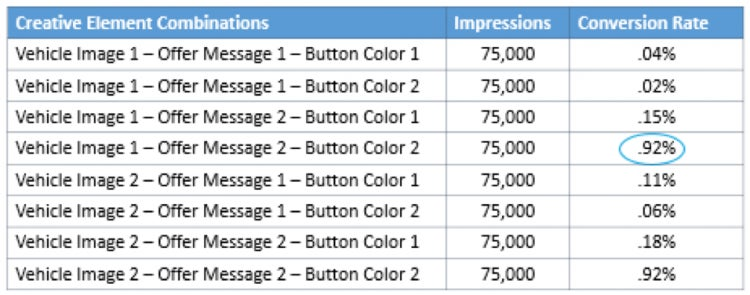
Algorithmic Creative Optimization For prospecting campaigns, the creative elements within the ad — images, border and button colors, messages, offers, call-to-action text, data-feed components, and recommended products, for instance — are optimized to meet the advertiser’s performance objectives. An advertiser could simply target their ads by region or zip code and allow DCO to optimize the ad’s creative elements to drive the best engagement and performance.
The DCO algorithm evaluates all possible ad permutations and optimizes delivery to the winner. Below is a simplified example.
Advertisers are able to turn creative optimization on or off as desired. For retargeting campaigns, an advertiser may prefer to set rules to drive ad-content decisions using the data feed. When the feature is turned on, customizable settings like lookback window and optimization performance indicators (clicks, conversions) are activated.
Other Cool DCO Capabilities DCO has many features that can help deliver better performances for your prospecting and retargeting campaigns. Personalize your ads with DCO and spice them up with some of these features:
Promotion Countdown Clock: Your ad includes a timer that counts down the days, hours, minutes, and seconds until your next sale, promotion — or the weekend.
Search Box: Users can search for city location, zip code, product, and more.
Drop-Down Menu: Users can select an option from the menu and be directed to a relevant landing page.
Moving Beyond Retargeting to Get the Most of DCO DCO allows an advertiser to target audiences across the marketing funnel. Beyond using DCO for reconnecting with and retargeting site visitors, advertisers can use DCO to deliver relevant experiences and better performances — for new-customer acquisition and awareness programs — and help fill the upper marketing funnel. Consider applying the full power of DCO to all your marketing programs to deliver deeper personalization and more relevant experiences for your users as they travel through the customer journey.
This is the fourth article in a five-part series on DCO. Check out the first three articles:
And stay tuned to learn more about what DCO can do for advertisers.
Title
The Power of Dynamic Creative Optimization (DCO) Beyond Retargeting
Description
Many advertisers are using dynamic creative optimization (DCO) for retargeting high-value website visitors who, based on their actions on the brand’s website — such as ...
Details
Marketing
CardDate
2016-10-31
CardImage
ContentType
caas:content-type/blog
Tags
caas:content-type/blog, caas:topic/marketing
Cookie Settings
General information
You can control how Adobe websites use cookies and similar technologies by making choices below. But note that if you disable cookies and similar technologies entirely, Adobe websites may not function properly.
Cookies are small text files stored by your web browser when you use websites. There are also other technologies that can be used for similar purposes like HTML5 Local Storage and local shared objects, web beacons, and embedded scripts. These technologies help us do things like remembering you and your preferences when you return to our sites, measure how you use the website, conduct market research, and gather information about the ads you see and interact with.
You can make choices in the menu below about what cookies and other technologies you want us to use on Adobe sites when you visit them from this browser. You can always change those choices later by clicking on the Cookie Preferences link at the bottom of the page.
If enabled:
We can improve your experience by tailoring the site and the content to things we think might be of interest
We can better keep track of your preferences — like what language you prefer to use
We will better understand your likely interests so we can provide you more relevant Adobe ads and content on non-Adobe websites and in non-Adobe apps
It will help us improve the performance of our website and those of our partners who use the Adobe Experience Cloud
If disabled:
We won’t be able to remember you from session to session so the experience may not be tailored to your interests
You’ll still have access to the content of the site but certain features that depend on cookies may not function
You’ll still see ads, they just may not be as relevant to you
General information
You can control how Adobe websites use cookies and similar technologies by making choices below. But note that if you disable cookies and similar technologies entirely, Adobe websites may not function properly.
Cookies are small text files stored by your web browser when you use websites. There are also other technologies that can be used for similar purposes like HTML5 Local Storage, web beacons, and embedded scripts. These technologies help us do things like remembering you and your preferences when you return to our sites, measure how you use the website, conduct market research, and gather information about the ads you see and interact with.
You can make choices in the menu below about what cookies and other technologies you want us to use on Adobe sites when you visit them from this browser. You can always change those choices later by clicking on the Cookie Preferences link at the bottom of the page.
If enabled:
We can improve your experience by tailoring the site and the content to things we think might be of interest
We can better keep track of your preferences — like what language you prefer to use
We will better understand your likely interests so we can provide you more relevant Adobe ads and content on non-Adobe websites and in non-Adobe apps
It will help us improve the performance of our website and those of our partners who use the Adobe Experience Cloud
If disabled:
We won’t be able to remember you from session to session so the experience may not be tailored to your interests
We’ll still count your use of our site and services
You’ll still have access to the content of the site but certain features that depend on cookies may not function
You’ll still see ads, they just may not be as relevant to you
Operate the site and core servicesOperate site and measure engagement
Always active
These cookies are required, and they are used to enable the site and related services core functionality. Without them the site could not operate, so they cannot be disabled.
These cookies enable the site and related services’ core functionality and collect statistics about user engagement, such as counting active use to help us understand trends. These cookies cannot be disabled.
Measure performance
These cookies are used to analyze site usage to measure and improve performance. Without them Adobe cannot know what content is most valued and how often unique visitors return to the site, making it hard to improve information we offer to you.
These cookies are used to analyze site usage to measure and improve performance. Without them Adobe cannot know what content is most valued, making it hard to improve information we offer to you.
Extend functionality
These cookies are used to enhance the functionality of Adobe sites such as remembering your settings and preferences to deliver a personalized experience; for example, your username, your repeated visits, preferred language, your country, or any other saved preference.
Personalize advertising
These cookies are used to enable Adobe and our partners to serve ads more relevant to your interests. Without them you will still see ads, but they might not be as relevant to you.