At GDC 2026 in San Francisco the Adobe Substance 3D team announced Substance 3D Painter 12.0, introducing improvements across layer stack, projection, rendering, and project setup along with content and refinements designed to empower indie developers, major studios, and 3D artists to create without constraints across texturing workflows. We also debuted an updated Substance 3D Designer with improvements to procedural shape workflows and expanded OpenPBR support, making it easier to build custom tools for Painter. The growing repository of content in the Substance 3D Assets library continues to expand with new content and is designed to work seamlessly across Painter, Sampler, and the wider Substance 3D ecosystem.
What’s new in Substance 3D Painter 12.0
Painter 12.0 introduces Warp to Geometry, developed in collaboration with Adobe Research, to streamline the process of applying decals to complex geometry, uneven surfaces, or meshes with holes.
Instead of projecting from a flat plane, Warp to Geometry uses a projection grid that can dynamically wrap itself onto the underlying surface. As you apply your decal when using this feature, the grid automatically adapts in real time to the curvature and structure of the mesh, allowing you to project details cleanly across complex forms — even in areas where traditional projection methods stretch or fade out.
Warp to Geometry.
This makes it easier to apply decals, trims, and detailed surface elements with confidence, while still giving you manual, additive controls when you want to push or refine the result artistically.
Flatten Inside Layer Stack
The new Flatten Inside Layer Stack option gives you a simple way to merge the contents of a layer or group into a single, clean result. Painter creates a new fill layer that contains the merged look, and the original layers are safely disabled so you can delete them or save them as a Smart Material for further editing. It’s a quick way to keep your project organized and running smoothly.
Flatten Inside Layer Stack.
Export Flattened Layers.
You can flatten multiple layers at once by grouping them first, and Painter also keeps track of your flattened results in the Asset panel, making them easy to find again. It’s also now possible to export flattened layers or masks directly to disk, including batch exports of several layers at once, making it easy to reuse, share, or archive data.
New and improved post-effects for final look development
Painter 12.0 also introduces new and improved post-effects, expanding what’s possible when previewing and presenting your work directly inside Painter.
This update brings together a range of effects commonly used during final look development, including Depth of Field with custom bokeh, bloom and glare, lens flares, lateral aberration, vignette, sharpening, and film grain.
New and improved post-effects.
This means that when preparing hero assets and environment art, the new post-processing stack helps you to prepare a rapid view of your scene entirely within Painter.
A streamlined project setup experience
Painter 12.0 introduces a simplified New Project window, alongside a revamped Project Configuration interface that makes key options easier to find and understand. A new Reload Mesh option also improves iteration, allowing you to update geometry without rebuilding your project from scratch.
Simplified New Project window.
What’s next: Substance 3D Painter 12.1 Public Beta
Alongside the 12.0 release, we’re also announcing the upcoming availability of the Substance 3D Painter 12.1 Public Beta offering an early look at upcoming improvements and new capabilities.
The beta introduces enhancements to baking workflows, new Skew Map painting functionality, and initial OpenPBR support. While this is just a first step, the public beta allows you to explore what’s coming next and provide feedback that helps shape future versions of Painter.
Updates to Substance 3D Designer
The latest release of Substance 3D Designer, which will be available soon, will bring
brings a set of targeted updates focused on improving procedural shape workflows, expanding OpenPBR support, and making it easier to build custom tools for Painter.
This release introduces the Shape Spatter v2 node, allowing artists to scatter 3D shapes defined as Signed Distance Field (SDF) functions. These shapes are raytraced and scattered individually in real time, enabling per-instance control over properties such as shape, orientation, and size. Shape Spatter v2 supports atlas inputs, allowing artists to scatter an unrestricted range of shapes from a single atlas without the limitations of the previous workflow.
In addition, this version brings significant improvements over the original node, with enhanced controls for scatter randomness, rotation randomness, size variation, and distribution. To complement the new scattering capabilities, the node comes with an expanded SDF toolkit, introducing a range of new nodes for creating, combining, and manipulating custom 3D SDF shapes.
Designer will also include new Ribbon graph samples to help artists get started creating their own Ribbon-based tools for Substance 3D Painter.
Finally, this release continues to build on OpenPBR support, with a new OpenPBR material model, updated graph templates and shaders, and an improved displacement UI to streamline material authoring for modern pipelines.
The Substance 3D team believes in the potential of OpenPBR for 3D workflows; to help accelerate its adoption across the ecosystem we’ve recently released a high‑quality, easy-to-use, production‑proven implementation as open source on GitHub. You can find that right here.
New content in Substance 3D Assets
The Substance 3D Assets library continues to expand with new content designed to work seamlessly across Painter, Sampler, and the wider Substance 3D ecosystem.
In mid-March we’ll debut Ribbon assets, a new asset type for Substance 3D Painter, which allows artists to place repeated elements along a path on a model and adjust their parameters as needed, making it easy to create trims, surface patterns, and other details that need to follow an object’s shape.
Ribbon Assets
We’re also adding Texture Generators, a new category of parametric noises, grunges, and patterns that behave like alphas. They can be used to add variation, imperfections, and surface depth within materials.
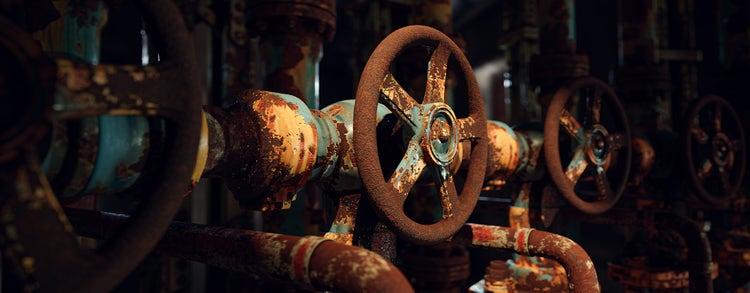
Finally, we’re announcing the release of a new Signature Collection by Loic Anquetil, Senior 3D Artist at Ubisoft. His Desirable Patina collection focuses on rusted and aged materials, offering versatile surfaces that can be reused across a wide range of projects. Keep your eyes open for that later this month!
Empowering artists
At Adobe Substance 3D, our mission is to empower you to create without constraints. This remains true for indie developers, major studios, and artists looking to refine their craft — and the goal of our latest updates is to give you more flexibility, efficiency, and creative liberty.