Every professional video editor knows the feeling: you're deep in a cut, and everything's clicking…until it isn't. You’re missing a b-roll shot to cover an awkward transition, or the perfect sound effect, forcing you to leave your timeline and start digging through libraries and websites, breaking your creative momentum.
Today, that changes with a powerful new set of AI-powered tools and upgrades in Premiere and After Effects that address some of the biggest pain points in video production, automate tedious tasks, and give you more time back for the parts of your creative craft that you love.
We're also celebrating a major milestone for Premiere. The Television Academy is recognizing Premiere with an Engineering, Science & Technology Emmy Award for Outstanding Achievement at the 2026 Emmys, honoring 35 years of giving filmmakers the tools to make television history and cementing Premiere as a cornerstone of post-production.
Let’s dive into what’s new!
Adobe's recent 2026 Creators' Toolkit Report found that nearly nine in ten creators accelerate the growth of their business or audience when they use creative AI tools like Adobe's. At the same time, an overwhelming majority say it's essential that final creative decision-making remains in their hands.
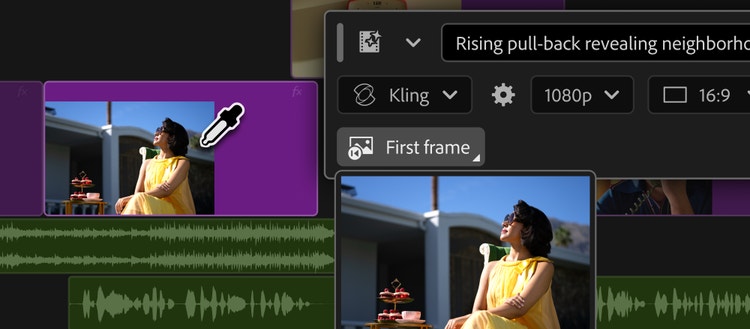
That balance between speed and creative control is at the heart of Premiere’s new Generative Media Tool, which helps you generate video and sound effects directly in your timeline, so you can create exactly what your scene needs and maintain complete creative control without bouncing between apps.
The new tool is intuitive. Get started by simply selecting Generative Media and defining where you want the result to appear. Describe what you need, and Premiere generates context-aware, fully editable video and audio clips you can refine and iterate on without leaving your project. You also have choice of which models to create with including Adobe Firefly and partner models including Google Veo, Kling, Runway and Luma, selecting the model that best fits your creative needs.
Tools in the task bar include:
- Generate Video: Editors can generate video to fill gaps in their timeline, using reference frames sampled from their project to create footage that better matches the visual context of the surrounding edit.
- Generate Sound Effects: Powered by Adobe’s commercially safe audio model, editors can generate sound effects directly in the timeline and even use their voice to guide the rhythm, timing and intensity.
- Generate Soundscape (beta): Editors can analyze up to 15 seconds of video to automatically generate contextually informed audio with layers of ambience and sound effects customized and timed to their edit. Designed as a starting point, Generate Soundscape helps editors quickly sketch out audio they can build on and refine.
- Generate Music (beta): Editors can generate original music with multiple variations to choose from, with controls for tempo and looping. Generated music is commercially safe, with synchronization rights across any type of media.
Smarter audio in Premiere
Noisy recordings, bad takes and overlapping dialogue can quickly slow down an edit. Our new AI audio tools in public beta empower you to quickly clean up, separate and refine your audio footage with speed and ease.
New audio tools include:
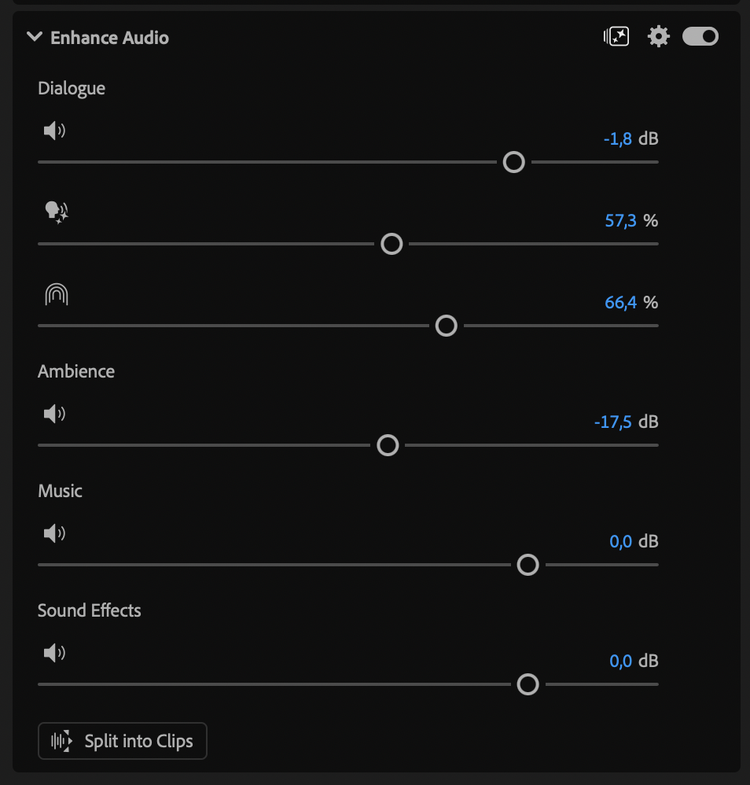
- Enhance Audio builds on Enhance Speech with the next generation of noise reduction, giving you independent control over dialogue, music, ambience and sound effects within a single clip, so you can remove elements you don't need, adjust layers independently or mute dialogue entirely.
- Separate Crosstalk automatically splits two overlapping speakers into independent tracks for separate mixing and editing, without re-recording.
- Dynamic Auto Ducking automatically balances dialogue, music and other elements without manual keyframes.
- Additional sound upgrades speed up everyday workflows including a new speed algorithm delivering natural-sounding duration changes across a wider range while preserving the original pitch and timbre.
Automate tedious tasks with AI Assistant in After Effects
It’s been exciting to see the engagement from video pros working with AI Assistant in Premiere to help with tedious, time-consuming tasks like organizing assets, batch renaming clips, adding markers and more.
Today, we’re expanding our creative agent to more professional video workflows, including motion design, with AI Assistant now available in public beta in After Effects. The AI Assistant offers a more intuitive way into the application for newer users, while helping experienced motion designers move faster by taking on tedious, technical and multi-step tasks that can interrupt your creative flow.
Built natively into After Effects, the AI Assistant works alongside you to help orchestrate multi-step workflows behind the scenes, freeing you up to focus on your craft. You remain in complete creative control, choosing what to hand off, what to refine and how to apply your taste, expertise and judgment to shape every editable outcome.
The AI Assistant in After Effects works across an entire project, not just the composition you have open. Describe what you want in plain language and it can help you reorganize large projects with thousands of layers, repair and solve technical issues, and create sophisticated motion effects like expressions without needing to write code. You can also call on the AI Assistant to help you with executing tasks based on your direction like inspecting compositions and footage, turning work that often takes hours into minutes.
Faster grades, deeper control in Color Mode
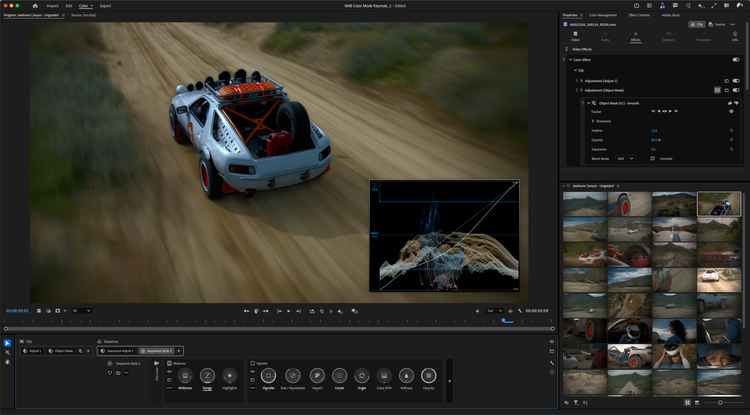
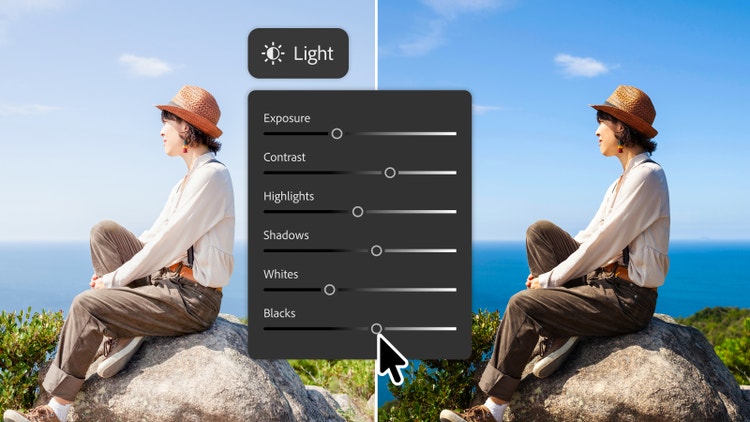
We're continuing our momentum to reinvent color with new updates to Color Mode in Premiere (beta), a first-of-its-kind grading experience built specifically for editors like you. As you increasingly manage the entire workflow yourself, Color Mode brings professional color tools directly into the edit. New Style Modules like Vignette and Midtones deliver authentic cinematic looks, and a new Auto Color tool corrects the color temperature and exposure of a clip, custom group or entire sequence in one click. Whether making quick adjustments or a final grade, Color Mode keeps the video front and center while giving you more control over how color flows through your project.
To keep up with the speed of your imagination and ensure you’re able to move fast, we've redesigned the Properties and Effects panels for faster navigation. Additionally, Frame.io Mounted Storage is now available to all accounts, so you can stream full-resolution media onto your Premiere timeline directly from the cloud, without manual downloads or clogged local storage.
Start creating with the latest innovations today!
Start creating with the latest tools in Premiere and After Effects today and share with us what you think – we can’t wait to see what you create!