A lot of work starts in documents like contracts, proposals, reports, and plans. Hundreds of millions of people trust Acrobat every year to help them read, understand and act on the information in their documents faster, smarter and more securely.
AI Assistant in Acrobat is where many begin. It helps you surface insights you can rely on across your documents. Ask questions and answers come with citations that let you view the exact spot in the source so you can verify the information, see the full context and dive deeper when it makes sense. At the same time, the world outside your documents keeps changing. Exchange rates move, market conditions shift, and new information emerges every day in industry reports, current regulations, or other sources across the web. That’s why we’re expanding where AI Assistant can look for answers, giving you the choice to add web search when you want to.
Your documents first
When you're working with a contract, a proposal, or a loan offer, the document is your source of truth. AI Assistant always starts there, and now when a question would benefit from outside context, you can choose to let it look to the web as well and bring that information into the same conversation. Every web-sourced answer includes a clickable citation, so you can check the source to verify information and read further.
Here's what that looks like.
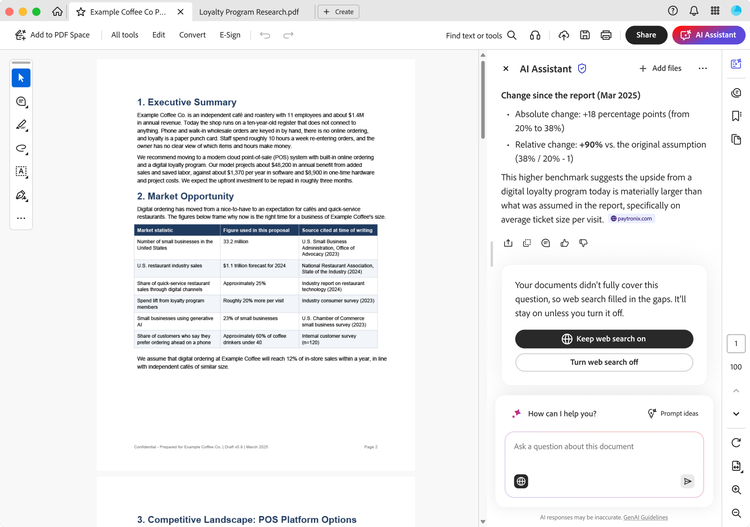
- A retail clothing store owner is reviewing a supplier contract and asks, "What are the payment terms?" The answer comes straight from the contract, with a citation to the relevant clause in the contract. Then she notices the supplier will invoice her in euros and wants to know what that is in U.S. dollars. With web search enabled in AI Assistant she can ask for the current exchange rate right in Acrobat and get a link to its source.
- A consultant has a proposal that's nearly ready. Before it goes out, he wants to know whether the market statistics, competitor details, and pricing assumptions still hold. AI Assistant uses the proposal as the source of truth, compares it with current information from the web, and flags what's worth refreshing. He decides which updates to make. Links let him check each source.
- A small business owner uploads a loan offer and asks whether the terms are competitive. AI Assistant quotes the interest rate and repayment terms from the offer itself, then shows how they compare with current market rates. Each figure carries its own citation, so he knows which numbers came from his paperwork, and which came from outside it.
- A real estate agent keeps a listing, an inspection report, HOA documents, and a market analysis in one PDF Space. She asks AI Assistant, "Is this property fairly priced, and what questions should I discuss with my client?" The answer draws on every file, pointing to the roof damage in the inspection report and the restrictions in the HOA documents. It then adds current comparable sales and local trends from the web.
The same approach fits many other kinds of work as well. Before a meeting, you can pair your own notes with recent news about your company or competitors. When you're refreshing a research report, you can see how the industry has changed since it was written.