Adobe and WhatsApp are bringing Acrobat-powered PDF experiences directly into WhatsApp Web and Windows, so you can open, review and act on your documents right in your chat without needing to download files or switch tools.
Many of WhatsApp's three billion users already use the platform to share files and move work forward. Adobe Acrobat has long delivered trusted PDF viewing, collaboration and AI-powered productivity in the places where people work with documents. Integrating Acrobat into WhatsApp extends that value, so you can stay in the flow whether you're reviewing an invoice, checking a contract, looking over a design or confirming details.
“Acrobat is built to power document workflows wherever they happen," said Abhigyan Modi, senior vice president, Creativity & Productivity Business. “Bringing PDF capabilities into WhatsApp Web and Windows extends that vision into one of the world’s most important communication platforms.”
Now available, globally
Acrobat-powered PDF experiences are now available globally on WhatsApp Web and Windows and include:
- Acrobat-powered PDF previews that open directly in your conversation
- Full-screen PDF viewing in chat, including for password-protected files
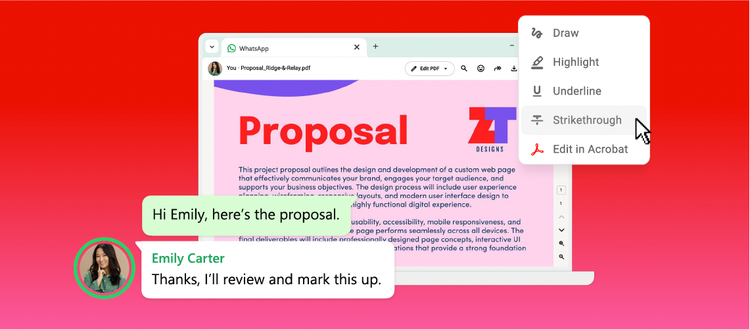
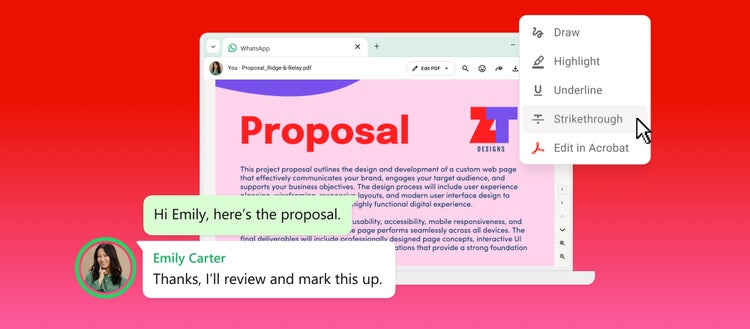
- Markup tools for you to highlight, strike through text and more
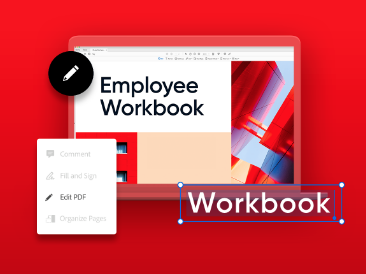
- Access to advanced Acrobat tools so you can edit and send the revised PDF right back to the chat
Open PDFs instantly without leaving your chat
Now, when someone shares a PDF in WhatsApp Web or Windows, you can open it instantly in the conversation. Scroll, zoom and read the full document without downloading the file or switching apps. Password-protected files stay secure, helping ensure only the intended recipients can access them.
With Acrobat powering the experience, your documents render exactly as intended, preserving layout and formatting. Documents shared within your chats remain end-to-end encrypted like all other personal messages, meaning that only those in the chat can read them.
Make lightweight markups right in the chat
Once you've reviewed the document, you can quickly add feedback right in the chat with PDF tools that allow you to draw, highlight, underline and strike through text. Circle a clause you want someone to double-check, cross out an outdated line or underline the details that matter most. You can make you markups without ever leaving WhatsApp, so you don't interrupt the chat.
Edit, share and unlock more with Acrobat
For more advanced needs, click “Edit in Acrobat” to access additional Acrobat tools so you can edit, organize, sign, apply password protection and more. With Acrobat AI Assistant, you can also summarize documents, ask questions and surface key insights in seconds. Advanced editing and AI Assistant capabilities are available with an Acrobat subscription. Once you’re done, just share the updated file back into the same WhatsApp conversation, so everyone stays aligned on the latest version.
This makes everyday workflows smoother. Whether you’re browsing a catalog and confirming selections, sending an invoice, reviewing contract terms, flagging changes or sharing edits, everything happens in one thread without breaking your flow. From first open to final version, everything stays connected.
Built for how you actually work
For many people around the world, WhatsApp is where professional and personal work gets done. Documents play a central role in that experience.
Whether you’re sharing invoices or catalogs with customers, reviewing contracts with collaborators, submitting assignments or forms or coordinating plans with shared itineraries, PDFs are part of an ongoing exchange that drives decisions.
On larger screens, this becomes even more powerful. The Acrobat integration in WhatsApp Web and Windows gives space to read, compare and respond in real time while staying connected to the conversation. With Acrobat powering the experience, everything looks as intended.
Keep work moving at the speed of chat
Work moves faster when your documents are right where you need them. By bringing Acrobat-powered PDF experiences into WhatsApp Web and Windows, you can go from receiving a document to acting on it instantly. And with Acrobat’s full capabilities, including AI Assistant, every document in your chat becomes something you can understand, edit and move forward.