Tax season can be a stressful time for everyone, whether you’re an individual filer, a small business owner or a self-employed entrepreneur. Gathering the right documents and organizing receipts to help ensure that everything is accurate can feel overwhelming. With Adobe Acrobat, tax preparation can be easier, faster and more secure. Let’s explore how Acrobat’s tools -- Protect & Sign with AI Assistant, Adobe Scan and Combine & Organize -- can help you take on tax season with confidence.
1. Digitize Your Paper Documents with Adobe Scan
One of the biggest challenges during tax season is dealing with paper clutter. From W-2s to receipts, invoices and donation records, it’s easy to misplace important documents. Adobe Scan can help by quickly turning all your paper tax documents into digital files that are easy to store, access and share.
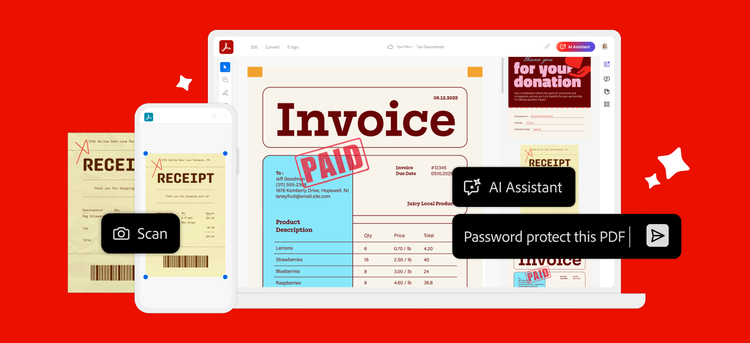
Imagine you’re a small business owner wrapping up the year -- with a shoebox (or three) full of receipts for office supplies, flights, coffee meetings and client dinners. Instead of spreading them across your kitchen table and sorting for hours, just grab your phone. Open Adobe Scan, snap a quick scan of each receipt and instantly turn them into clean, organized PDFs. In minutes, everything’s digitized, neatly stored and ready for tax time. No more lost receipts. No more last-minute scrambling. Just simple, stress-free organization that keeps your business moving forward.
2. Combine & Organize Your Tax Documents
Once you’ve digitized your documents, the next step is to organize them. Acrobat’s Combine & Organize feature allows you to merge multiple files into a single PDF and arrange them in a way that makes sense for your filing process. Whether you’re an individual filer or managing a small business, Acrobat helps you consolidate all your tax information into a single document, so it’s easy to share with tax professionals.
Let’s say you’re a freelancer juggling multiple 1099s from different clients -- plus invoices and expense records on top of that. Instead of digging through folders (or your desktop) at tax time, you can use Acrobat to pull everything together into one organized PDF. Combine your 1099s, invoices and expense documents in seconds. Need to reorder pages, delete extras or add one more file? Easy. So, when it’s time to file, you’re not scrambling for scattered documents -- everything you need is neatly organized in a single, ready-to-go PDF.
3. Ask AI Assistant to Protect & Sign Your Tax Documents
Tax documents often contain sensitive information like your Social Security number, income details and bank account information that need to be protected before they’re shared. With Protect & Sign with AI Assistant, you can simply type a prompt to sign and secure your documents before sending them to your accountant.
Picture this: You’re a self-employed graphic designer who needs to send your tax documents to your accountant. All you have to do is type “Password-protect this file” and AI Assistant takes care of it -- helping secure the document so only the intended recipient can access it. Need to sign it too? Simply ask AI Assistant to add your digital signature and it’s done in seconds. No extra steps. No hassle. Just a secure, signed document, ready to send to your accountant.
Why Acrobat is the ultimate tax prep partner
Adobe Acrobat is designed to make tax preparation easier for everyone. Whether you’re an individual filer looking to organize your W-2s and childcare expense receipts, a small business owner managing payroll records and itemized deductions or a self-employed entrepreneur tracking invoices and expenses, Acrobat has the tools to help you stay organized, save time, and gain peace of mind.
Get started today
This tax season, Adobe Acrobat can be your trusted partner. From scanning paper documents to organizing files and securing sensitive information, Acrobat has everything you need to make tax prep easier. Whether you’re filing for yourself, your business or your freelance work, Acrobat’s tools are here to help you stay on top of your tax game.
Start using Adobe Acrobat today and experience the difference it can make in your tax preparation process.
Simplify tax season by scanning your documents with Adobe Scan -- download today!