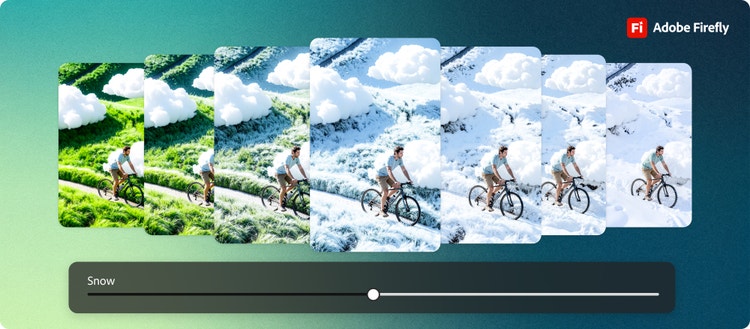
If you’ve ever used AI to create an image and thought, “This is close, but not quite what I imagined,” then you’re going to love Precision Flow and AI Markup, two new powerful and intuitive editing tools in Adobe Firefly, your all-in-one creative AI studio. Together, these two features make it easy to generate or upload any image and quickly refine it, so you can produce exactly what you’re looking for.
Precision Flow and AI Markup help you guide your visuals with confidence and show how Firefly is moving beyond content generation, putting creators in the driver’s seat with best-in-class capabilities that combine precision, speed, and confidence, all in one place.
Introducing Precision Flow
Editing images with AI can sometimes be frustratingly inexact. Let’s say you’re creating an image and ask for “more trees,” but will you get one or a forest? Small adjustments often feel like guesswork, leaving you unsure if the results will match your vision.
Now in beta, Precision Flow in the Firefly image editor changes that. It generates a range of results from a single prompt, letting you explore multiple interpretations of your image — from one extreme to the other. With an intuitive slider, you can quickly browse through the different versions and select the one that best matches your vision, saving time and sparking creativity.
We designed Precision Flow to give you a simple way to explore and refine your images without rewriting prompts or relying on one-off tools. Shift lighting from soft to dramatic, change a summer scene to autumn, or tweak the intensity of an image style to land on the perfect look. The real magic is in the sliding scale that lets you dial in subtle changes or bold transformations with ease. It’s a fast, flexible way to take your images from “almost there” to “just right”.
- Refine lighting: Slide from bright to soft light until the mood feels perfect.
- Change the weather: Move from clear skies to snowy scenes for the ideal seasonal look.
- Experiment with mood: Shift from warm to cool tones to find an atmosphere that clicks.
- Shift time of day: Explore golden hour, dusk, or night in a single slider.
- Add elements: Introduce objects, like trees in a forest or furniture in a room, to build up a scene.
To start using Precision Flow, upload or generate an image in the Firefly image editor and select the feature from the left-side menu. Describe in your own words how you want your image to change. Do you want to adjust the lighting? Change the weather? Shift the mood or style? Precision Flow generates a range of options, so you can select the one that works best.
A few simple choices will guide your edits:
- Select the whole image, a portion, or brush over the specific area you want to change.
- Use Edit strength to control how subtle or dramatic each variation appears. Use the slider to explore subtle shifts or dramatic transformations.
- Generate image variations between two extremes to fine-tune results and find the perfect version.
Precision Flow shines when you want to experiment. You can explore multiple variations, preview intermediate steps, and land on the image you imagined, all without rewriting prompts or starting over. Try it today and find your perfect look faster.
Meet AI Markup
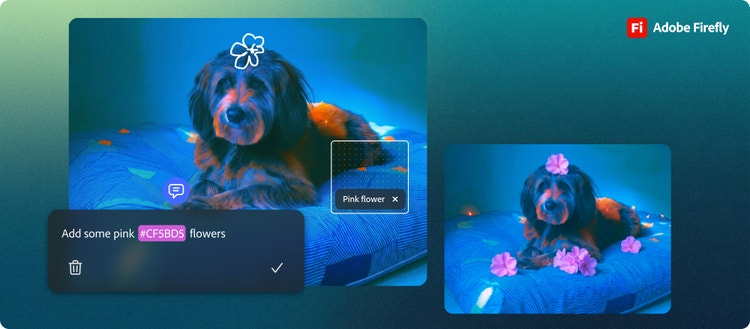
We’re also launching AI Markup, a gamechanger for anyone who wants hands-on control over their edits. No more guessing how AI will interpret a prompt. With AI Markup, you can draw, annotate, and add text prompts to show exactly how you want your picture to change.